The LLM world has never been busier. The part I follow most closely, honestly, is the open weight one. On 1 September 2026, on the Artificial Analysis Intelligence Index, Kimi K3 and GLM-5.3 sit at 60 points against the 63 of Claude Opus 5 and the 61 of GPT-5.6 Sol. They have not taken the top spot, and Claude Fable 5.1 has just landed above everyone at 66 points, so the frontier has moved again in the meantime. Still, they are three points off Opus 5, next to nothing compared with the gap we were used to. A word of warning, I don’t want to dwell on benchmarks. I have tried these models myself, and the improvements are there.
My home infrastructure can’t run models of that size. Locally I have to settle for models up to 30B parameters. Kimi and GLM, though, can be tried through their APIs at a token cost that is negligible next to the private frontier models.
I have to admit, though, that keeping up with all this is getting harder. Every time you move from one coding agent to another to try a new model, or because your project stalls against a provider’s usage limits, your productivity pays for it. This is where Omnigent comes in.
I work on Databricks every day and use the platform in full. Omnigent is one of its latest additions: it changes how you work with Databricks, but it can also stand on its own. You can deploy it outside Databricks too, so I could hardly resist putting it on my home server.
Omnigent is an open source project that describes itself as a meta-harness, released under the Apache License 2.0 by Databricks, built by their AI team together with Neon.
First, a step back. What is a harness? This is the first time the term shows up on my blog.
What is a harness, and how does it differ from a coding agent?
A harness is the infrastructure that lets an LLM turn its own answers into real actions.
The model, the “brain” of the system (say Claude Opus 5 or GPT-5.6), takes in a context, a question for instance, and generates a sequence of tokens, which is the text of the answer. On its own, though, it cannot open a file, run a command, reach a repository or remember what it did in an earlier session.
The harness is what puts the model in a position to work, by handling:
- the agent loop: the cycle between decision, action and result
- tools: access to the filesystem, the shell and anything else
- permissions
- the context window: what to load, what to summarise, what to drop
- session memory
- sub-agents
A coding agent, on the other hand, is the complete system, specialised in software development. It usually bundles an LLM, a harness, instructions, tools and operating rules.
Claude Code, Codex and OpenCode are therefore complete products, coding agents, not simply harnesses. Even when different coding agents run on the same LLM they can behave very differently, because the context they are given changes, and so do the tools available, the permissions, and so on. What changes, in short, is the way the work is organised.
In short:
The LLM thinks, the harness lets it act, the coding agent is the complete system that does the work.
So what is a meta-harness?
A meta-harness is the orchestration layer sitting above several agents and their harnesses. It provides one common interface to combine them, swap them and have them work together, without rewriting the whole system every time.
It can also apply central policies over permissions, costs and risky operations, run everything inside isolated environments, and coordinate work across different agents, people and models.
A meta-harness is a common layer above several agents and harnesses: it makes them interoperable, orchestrates them and applies policies across all of them.
What Omnigent is, and what it brings
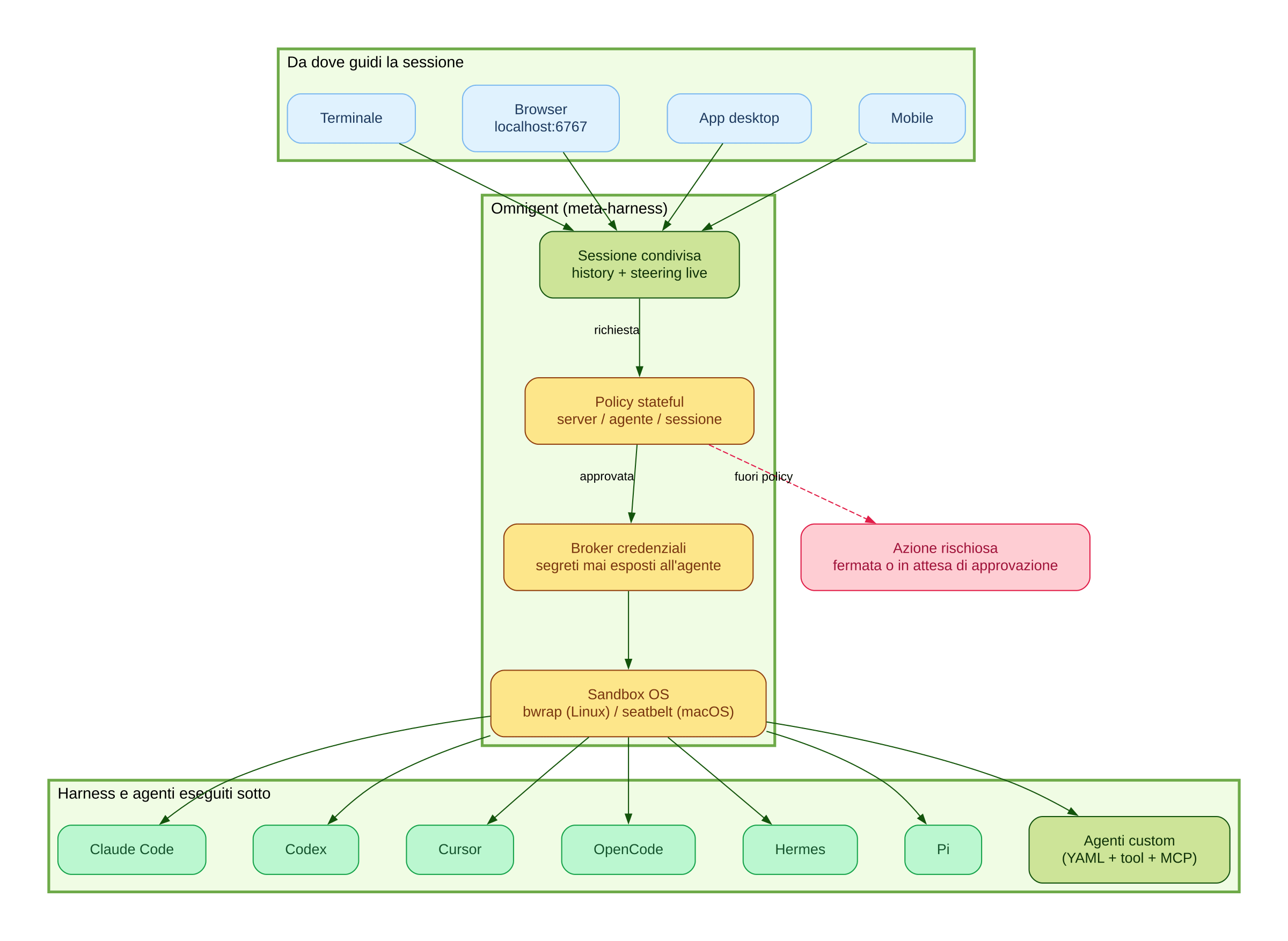
Omnigent describes itself in exactly those terms, an open source meta-harness that puts a common orchestration layer over Claude Code, Codex, Cursor, OpenCode, Hermes, Pi and the agents you write yourself.
Working with it made me realise how much the choice of coding agent and the project setup matter, since the quality of the output and the cost of the project both hang on them.
With Omnigent you can start a project and put several agents on several models to work, seating different agents at the same table and having them work as a team. That also lets you use open weight models locally, even in the more demanding workflows.
As an example, I’m putting together a working flow for analysing and configuring my own Data Platform. I can hand the analysis of the source files to an open weight model running on my home workstation for local inference, keeping full control of my own data, and have it extract the metadata. From there I carry on configuring the platform with frontier models, which are undoubtedly better at development work than a 30B open weight model.
Another strength is how flexible the deployment is. Right now I’m running the project on my own local server, and thanks to my VPN I can reach it remotely, from the phone too, and pick my work back up with what is still a desktop setup, giving up nothing.
The architecture of the project makes this clearer.
Architecture
The official description sets out two key components. The runner wraps any agent in a sandboxed session behind a uniform API. The server adds policies and shared history, and exposes every session over the terminal, the web, a native app, mobile and a REST API.
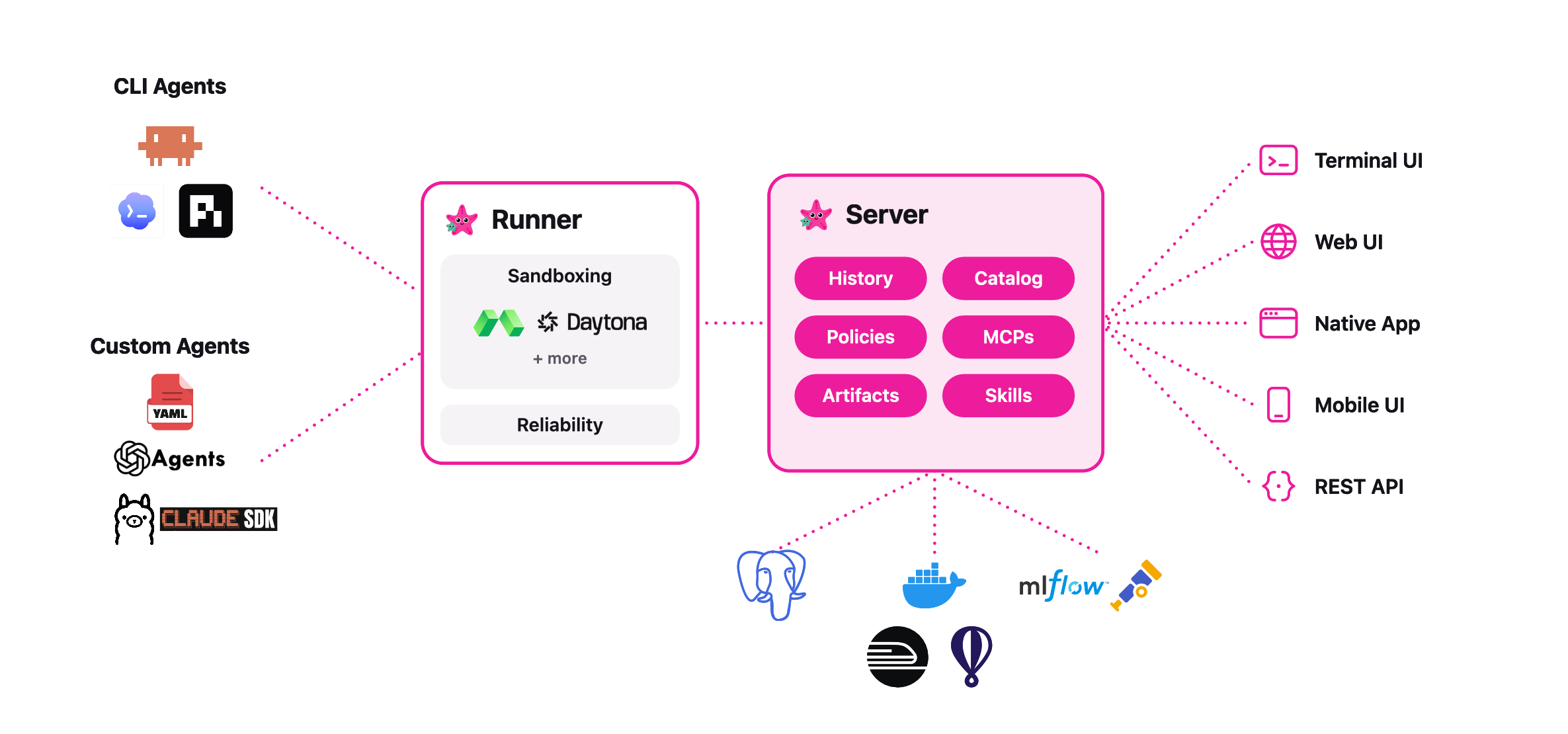
There are several ways to reach Omnigent:
- From the terminal, where Omnigent can start the vendor’s own CLI as it is and attach it to the session (
omnigent claude,omnigent codexand the others);omnigent run agent.yamlstarts an agent you defined yourself, on a harness reached through its SDK.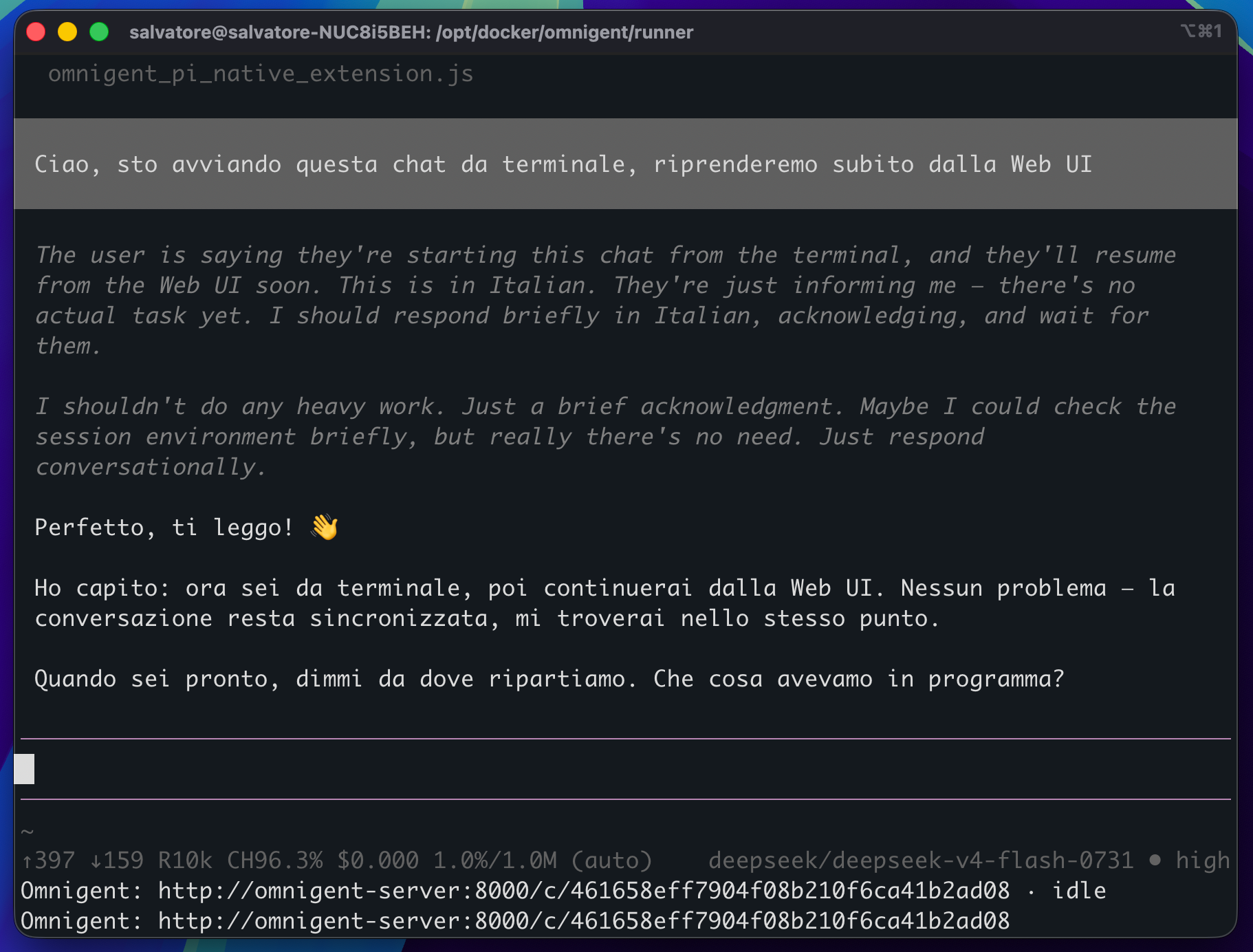
- From the web UI on
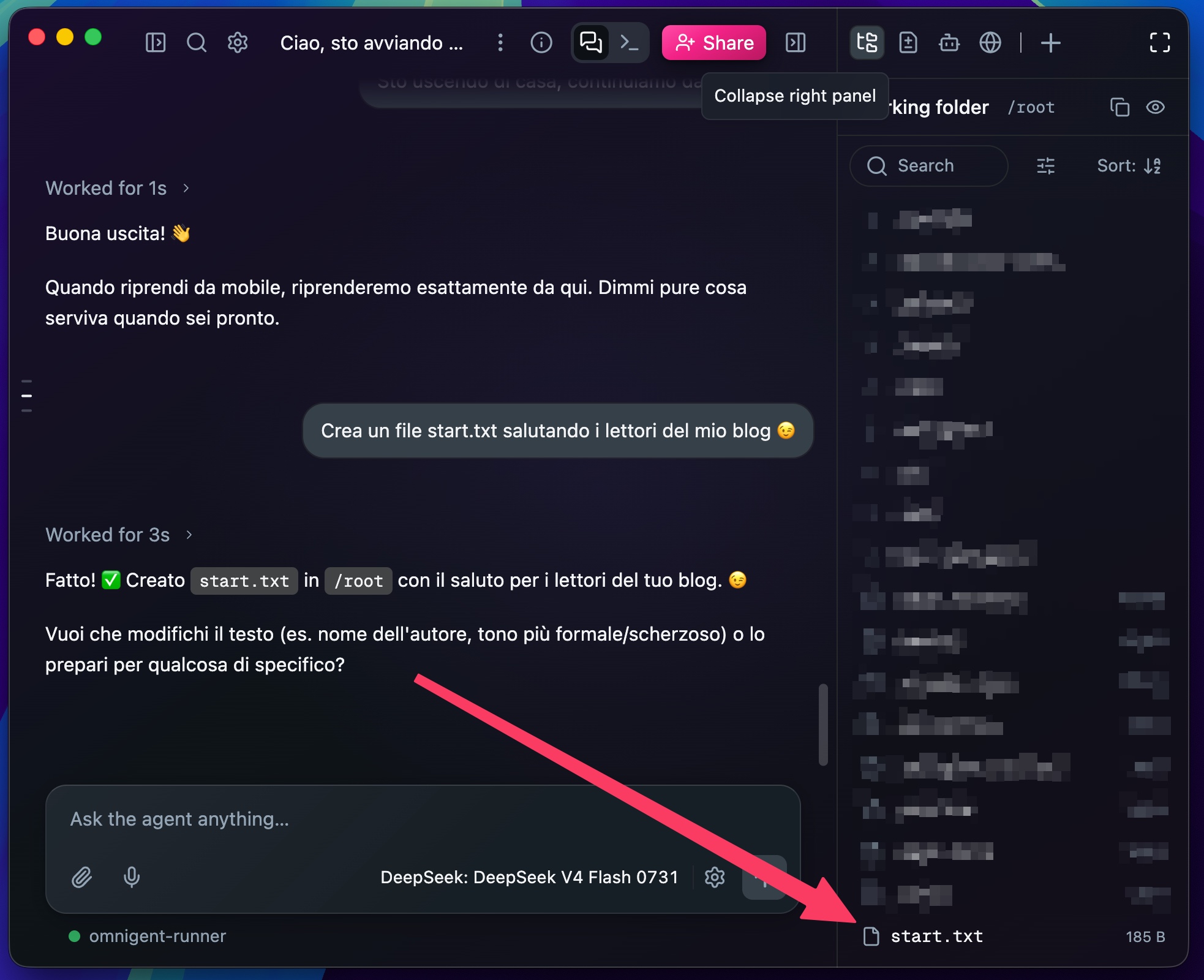
localhost:6767, the common interface to all your sessions. Sessions follow you, you start in the terminal, carry on in the browser, pick it up on your phone.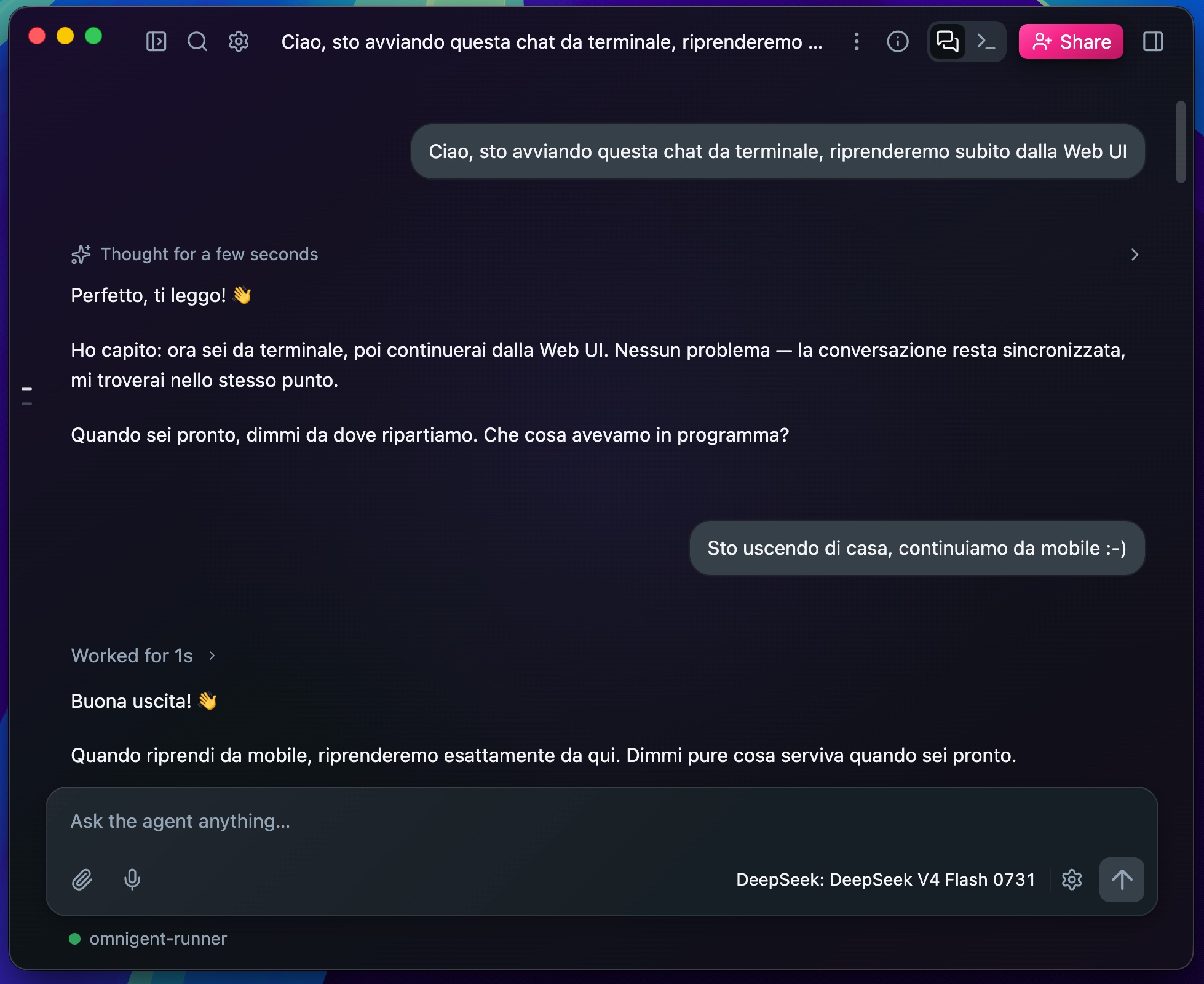
- From mobile, by installing the official app

You can keep switching client, the session stays the same!
Every action goes through policies, credentials and the runner. The runner is what puts the agent inside a sandbox: bwrap on Linux, seatbelt on macOS, or a disposable remote sandbox on Modal, E2B, Kubernetes and others.
Inside the harness runs the agent with its own tools, local Python functions, MCP servers, sub-agents.
A team, not an assistant
Here is the part that changes the way you work, quoting a line from the project README:
“Ask one agent to review another’s work, or split a task across agents that are each good at different things.”
Instead of picking a single model or a single coding agent, we hand the task to whoever suits it best and let the agents work together.
To build our team of agents, all we need is the YAML file that captures how we picture the project:
name: my_agent
prompt: You are a helpful data analyst.

executor:
  harness: claude-sdk          # or: claude-native, codex, codex-native, cursor,
                               # cursor-native, hermes, hermes-native, opencode,
                               # pi, pi-native, openai-agents

tools:
  # A local Python function (schema auto-generated from the signature)
  word_count:
    type: function
    callable: mypackage.mymodule.word_count

  # Tools from an MCP server (a local command, or a remote URL)
  docs:
    type: mcp
    url: https://example.com/mcp

  # A sub-agent the supervisor can delegate to
  researcher:
    type: agent
    prompt: Search for relevant information and summarize it.
    tools:
      word_count: inherit
The harness is a field like any other, so the line you change to move the agent from Claude Code to Codex is a single one. A sub-agent is declared as a tool, with its own prompt and the tools inherited from the supervisor, delegation is not a separate feature, it is the same structure applied recursively. And MCP servers are how the agent reaches the outside world.
The repository ships example agents that show where this structure leads.
- Polly: your tech lead, who plans, delegates to sub-agents in parallel git worktrees, and routes every diff to a reviewer from a different vendor than the one that produced it.
- Debby: a brainstorming partner with two heads, one Claude and one GPT, answering every question with both answers side by side.
Here is Debby at work:


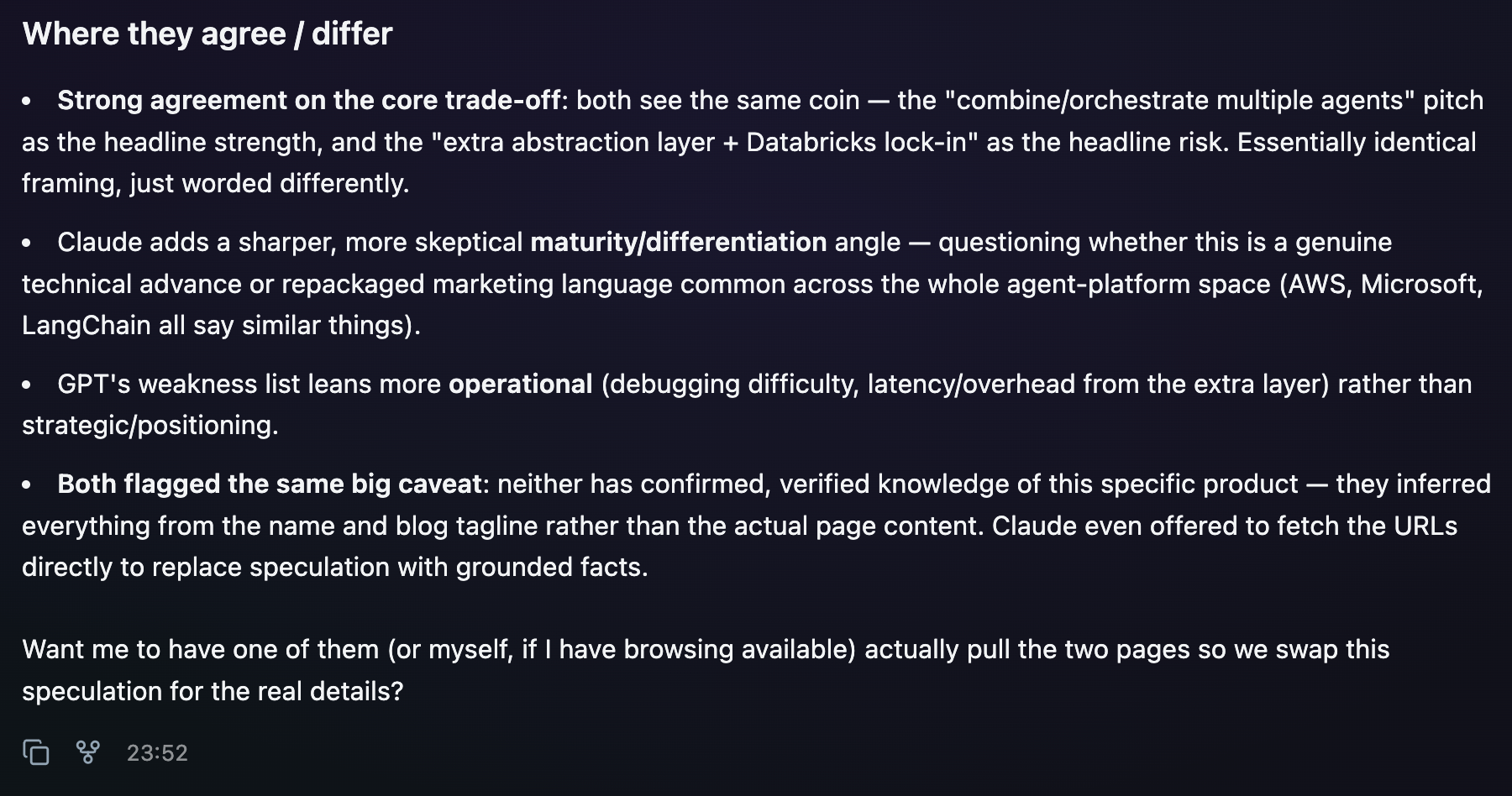
With this approach you stop thinking in terms of tools and start thinking in terms of tasks, every piece of work gets the model and the harness it needs, and opening Claude Code rather than Codex becomes a configuration detail.
A wider team
So far I have talked about agents working with each other, but the team is not made of them alone!
Omnigent takes the session and turns it into a shared environment.
There are several ways into a session (a chat), and they are far more different from one another than they look.
- Share: you share the session as a link. Whoever joins gets the full history, watches the agent work live and can chat with it.
- Co-drive: a colleague hooks in and sends commands that run on your machine, inside your session.
- Fork: whoever joins clones the conversation onto their own machine and carries on independently from the point where they broke off.
The official announcement sums it up in one line:
“You can invite other people to view your agent session, comment on files in its workspace, or even send commands, so your sessions and working directories become the main place you collaborate”.
The jump is not being able to show a colleague what your agent produced, it is being able to share the reasoning as it happens, and to work on the same project files. The kind of interaction changes, if your colleagues see the session from the start, they don’t have to rebuild the story from a project summary or work out what the files are doing, and that is usually where the information you needed gets lost. The three modes cover different needs, fork is for whoever wants to try another route without disturbing you, co-drive is for whoever knows that part better than you and is quicker putting their own hands on it, share is for everyone else.
One thing has to be spelled out about co-drive though, you are giving another person the ability to run commands on your machine, inside a session that already carries your permissions and your credentials. That is exactly why the policies I describe below are not an accessory.
Policies live outside the prompt
One important point about policies is stated plainly in the official documentation: guardrails are enforced “at the meta-harness layer, not via prompts”. Anyone who has tried to govern an agent by writing “don’t touch production” into the system prompt is asking a model for a favour. Here the request is intercepted before it reaches the operating system, and the model has no say in it.
Policies stack across three levels, server, agent and session, with the stricter session rules checked first. You declare them under a name of your own and point them at a built-in handler: ask_on_os_tools asks for your approval before shell and file operations, max_tool_calls_per_session caps the number of calls, cost_budget sets a spending limit with a warning threshold.
What sets them apart from a list of permissions is that they take into account what has already happened in the session. The example in the announcement is the best I have read on the subject, you can decide that once an agent has downloaded a new package from npm, a git push requires human approval. The same logic applies to the project budget, where the agent stops and asks you whether to carry on.
What to watch out for
Starting with the simplest one. The public repository opened on 11 June 2026 and the project calls itself alpha. As of 1 September it counts 9,587 stars, 1,482 forks and 1,200 open issues, interfaces that change, features that shift, expectations to be set accordingly. If you put it in the middle of a team’s workflow, you do it knowing that the ground is still moving.
Using Omnigent makes me wonder, are several agents working in parallel really an advantage? One agent working on its own you can follow, three agents working in parallel you don’t follow, you weigh up what they implemented.
These new tools make me think about how my own role is changing, I spend far less time writing code and far more time telling my ideas, while someone else, an agent that never tires and never gets bored, gets on with the implementation. It is a different job, and above all it degrades differently.
When you write code, when you build new architectures, and you are tired, you slow down … when you review your agents’ work and you are tired, you approve.
These tools are a formidable and essential weapon, but be careful, we shouldn’t think we can do more while tiring ourselves less, because a high quality result demands your full attention.
Where is all this heading?
First the model was what mattered, then the coding agent. If that is the direction, the next question to ask is: how is the team of agents put together, and who is allowed to do what? Which tasks you hand to a model running at home and which to a frontier model, who reviews whose work, who else can join and with which permissions, and what you have put in writing that none of them may touch.
They are the same questions you ask when you put together a team of people, which is why the title of this article talks about extending your team. Except that it isn’t a metaphor, your team holds the agents you picked and the colleagues you invite into the session. What makes it different from any other team is that here you define your agent colleagues yourself, in a YAML file, and the rules for its members are not something you ask for politely, you write them into a policy.
One piece stays outside this article, and it is the one I care about most, what happens when this layer meets the data platform underneath it. Omnigent’s native integration with Databricks deserves an article of its own. I want to do it with proper testing behind it, and I’m working on it.
Resources
- Introducing Omnigent: A Meta-Harness to Combine, Control and Share Your Agents (official announcement, Databricks Blog, 13 June 2026, by Matei Zaharia, Kasey Uhlenhuth and Corey Zumar)
- omnigent-ai/omnigent on GitHub (official repository)
- omnigent.ai (official site)
- Artificial Analysis Intelligence Index (aggregated benchmark leaderboard, consulted on 1 September 2026, for how open weight models stand against the frontier ones)